Introduction
Writing a dissertation is one of the most challenging tasks in academic life. Beyond research, analysis, and writing, one critical aspect that often determines the first impression of your work is formatting. A well-formatted dissertation ensures clarity, professionalism, and adherence to university standards.
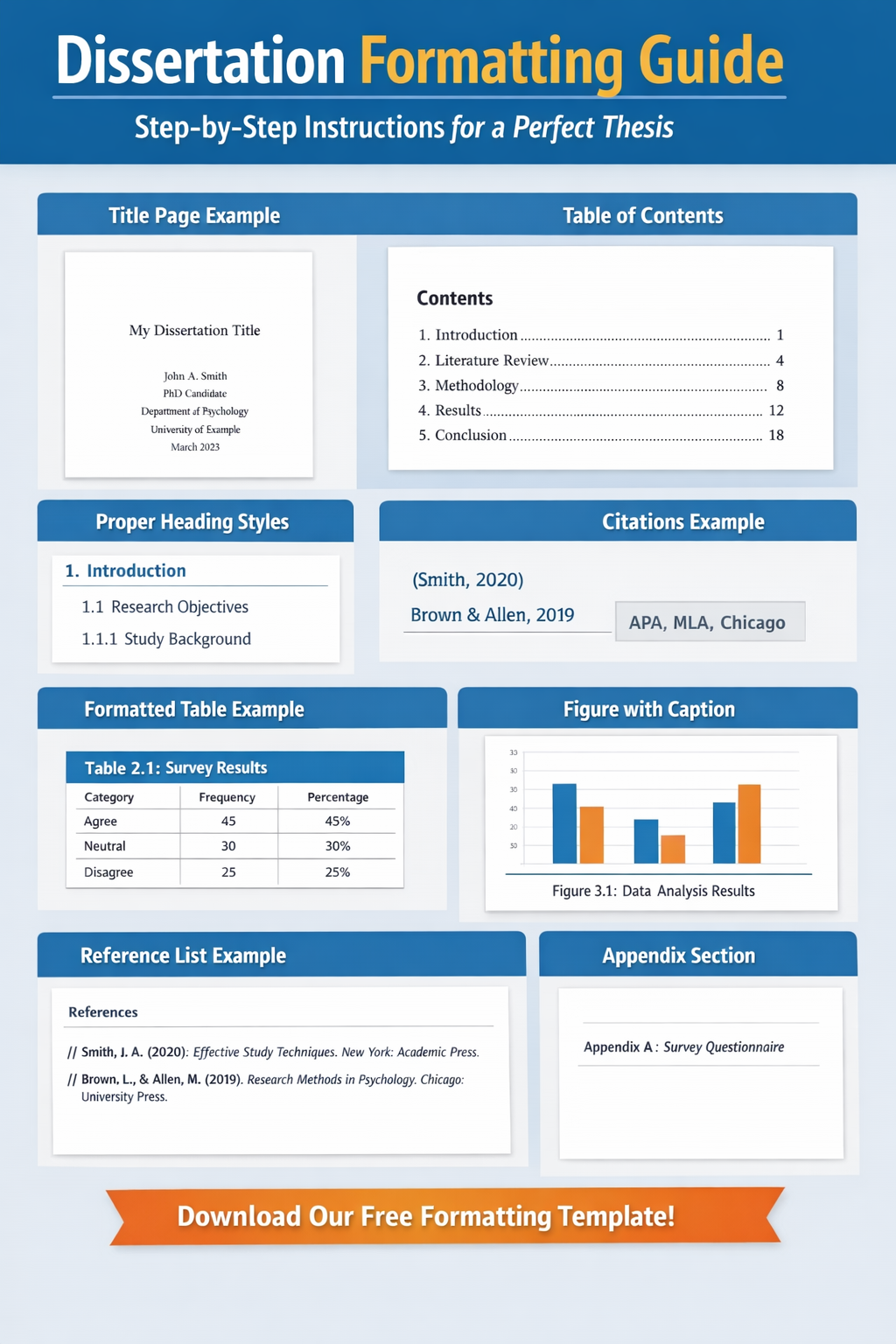
Our Dissertation Formatting Guide provides a detailed roadmap covering every aspect—from page setup to tables, citations, and appendices. By following this guide, you can save time, avoid costly revisions, and present a polished, examiner-friendly dissertation.
1. Understanding University Guidelines
Before beginning your formatting, consult your university’s dissertation handbook. While general rules are similar, some institutions have specific requirements. Key areas to check include:
Margins: Usually 1 inch (2.54 cm) on all sides
Font style and size: Times New Roman or Arial, size 12 for text
Line spacing: 1.5 or double spacing
Page numbering: Bottom center or bottom right
Heading styles: Specific hierarchy for chapters and subheadings
Ignoring these guidelines can lead to unnecessary revisions, so getting them right from the start is crucial.
2. Title Page: Your Dissertation’s First Impression
The title page is the very first element your examiners see, making it essential to format it correctly. A typical title page includes:
Dissertation title (clear and concise)
Your name and student ID
Degree program
University name
Submission date
Pro tip: Center all elements and use consistent font sizes. Avoid bolding or underlining unless specified by your university.
3. Abstract: Summarizing Your Work
The abstract is a brief summary of your dissertation, often the first part that readers examine. A well-crafted abstract:
Is typically 150–300 words
Includes research objectives, methodology, findings, and conclusions
Avoids citations and abbreviations
Make your abstract engaging while concise. A clear abstract can help your dissertation stand out and guide examiners through your research.
4. A Detailed Table of Contents
A Table of Contents (TOC) is more than a list of chapters—it’s a roadmap for your dissertation. Your TOC should include:
Chapter titles and subheadings
Page numbers aligned correctly
Lists of figures, tables, and abbreviations
Most word processors, including Microsoft Word and Google Docs, allow automatic TOC generation, ensuring page numbers update dynamically as you edit.
5. Chapter Formatting Guidelines
Each chapter must follow a structured format to maintain consistency. Here’s a detailed breakdown:
a) Introduction Chapter
Present the research problem clearly
Define objectives and research questions
Outline the significance of your study
b) Literature Review
Summarize existing studies relevant to your research
Identify gaps in the literature
Discuss theoretical frameworks or models
c) Methodology
Explain your research design and approach
Include data collection methods and sampling techniques
Justify your choice of methods and tools
d) Results and Analysis
Present findings using tables, graphs, and charts
Include clear labels and captions
Analyze data logically and connect it to your research questions
e) Discussion and Conclusion
Interpret your results in relation to previous research
Highlight implications, limitations, and recommendations
Suggest areas for future research
6. Citations and References
Proper referencing is critical for credibility and academic integrity. Depending on your discipline, use a consistent citation style:
APA: Common in social sciences
MLA: Often used in humanities
Chicago or Harvard: Popular in history, business, and some sciences
Tips for accurate referencing:
Include all sources cited in your text
Maintain consistent punctuation and formatting
Use reference management tools like Zotero, Mendeley, or EndNote
Improper referencing can lead to plagiarism issues, so it’s worth investing time to get it right.
7. Figures, Tables, and Appendices
Visual aids enhance understanding but must follow formatting rules:
Number figures and tables sequentially (e.g., Table 1.1, Figure 2.3)
Include descriptive captions below figures and above tables
Maintain proper alignment within page margins
Appendices can include supplementary material like raw data, questionnaires, or detailed calculations
Pro tip: Cross-reference figures and tables in your text (e.g., “As shown in Figure 2.1…”) for smooth flow and professionalism.
8. Proofreading and Consistency Checks
Even a perfectly formatted dissertation can suffer if errors persist. Ensure:
Headings and subheadings are consistent across chapters
Page numbers and numbering style are correct
Spacing, fonts, and margins are uniform
References match in-text citations
Grammar, spelling, and punctuation are flawless
Use tools like Grammarly, Hemingway, or university proofreading services for a final polish.
9. Bonus Tips for Professional Formatting
Use Styles in Word: Applying “Heading 1”, “Heading 2”, etc., makes TOC generation seamless.
Stick to One Font Family: Avoid mixing fonts; consistency looks professional.
Keep Tables and Figures Within Margins: Prevents printing or binding issues.
Check University Templates: Many universities provide pre-formatted templates to simplify work.
Save Incrementally: Use version control to avoid losing edits.
10. Common Dissertation Formatting Mistakes
Even experienced students make errors. Avoid these common pitfalls:
Inconsistent chapter headings
Incorrect page numbering
Missing captions for figures or tables
Mixing multiple citation styles
Ignoring university-specific guidelines
Catching these early can save time and prevent frustration during submission.
11. Tools to Simplify Dissertation Formatting
Several tools can make formatting easier:
Microsoft Word: Best for TOC, headings, and styles
Google Docs: Good for collaboration
LaTeX: Ideal for technical, math-heavy dissertations
Reference Managers: Zotero, Mendeley, EndNote for citations
Choosing the right tools ensures your formatting is precise and professional.
Conclusion
Formatting a dissertation may seem tedious, but it is a crucial step in academic success. Following this Dissertation Formatting Guide ensures your thesis is examiner-ready, well-organized, and visually appealing.
A professional format not only reflects your attention to detail but also enhances readability, making your research accessible and credible. Start formatting early, follow your university guidelines, and leverage templates and tools to save time.
1. Understanding Formatting Guidelines
Every university may have slightly different rules. Typical requirements include:
Margins: 1 inch (2.54 cm) on all sides
Font style: Times New Roman or Arial, size 12 for text, size 14–16 for headings
Line spacing: 1.5 or double spacing for text; single spacing for tables and footnotes
Paragraph alignment: Justified for professional appearance
Page numbering: Bottom center or bottom right
Headings: Consistent hierarchy (Heading 1 for chapters, Heading 2 for sections, Heading 3 for subsections)
Pro Tip: Check if your university provides a template. Using it can save hours of formatting work.
2. Title Page: Setting the Tone
The title page is your first impression. Include:
Dissertation title (concise, accurate, and descriptive)
Full name and student ID
Degree program and department
University name
Submission date
Ensure everything is centered and consistent. Avoid bolding, italics, or fancy fonts unless required.
3. Abstract
Your abstract is a mini-summary of your research. It should:
Be 150–300 words
Highlight objectives, methodology, results, and conclusions
Avoid references, abbreviations, or complex details
Tip: Write your abstract last, after completing your dissertation. This ensures it accurately reflects your research.
4. A Clear Table of Contents
A structured Table of Contents (TOC) helps readers navigate your dissertation. Include:
Chapters, sections, and sub-sections
Page numbers aligned correctly
Lists of figures, tables, abbreviations, and appendices
Use automatic TOC generation in Word or LaTeX to save time.
5. Chapter Formatting
Chapter 1: Introduction
Present your research problem
State objectives and research questions
Explain the significance of the study
Include a brief outline of the dissertation
Chapter 2: Literature Review
Summarize previous research relevant to your topic
Identify gaps your study addresses
Include theoretical frameworks
Chapter 3: Methodology
Explain your research design
Describe data collection and analysis methods
Justify your methodological choices
Chapter 4: Results
Present your findings using tables, charts, and figures
Number and label all visual elements correctly
Avoid interpreting results here—focus on reporting
Chapter 5: Discussion
Interpret results and relate them to your research questions
Compare findings with existing literature
Discuss implications, limitations, and recommendations
Chapter 6: Conclusion
Summarize key findings
Suggest practical applications or areas for future research
Keep it concise and focused
6. Figures, Tables, and Illustrations
Visual elements improve clarity but must be formatted consistently:
Number sequentially: Table 1.1, Figure 2.3
Include captions: Below figures, above tables
Align properly: Ensure they fit within margins
Reference in text: e.g., “As shown in Figure 2.1…”
Tip: Keep figure and table styles uniform across the dissertation.
7. Citations and References
Correct referencing is critical. Depending on your field, use a consistent style:
APA: Social sciences
MLA: Humanities
Harvard or Chicago: Business, history, technical subjects
Tips:
All in-text citations must match the reference list
Use reference managers like Zotero, Mendeley, or EndNote
Check for proper capitalization, italics, and punctuation
8. Appendices
Appendices include supplementary materials:
Questionnaires or surveys
Raw data sets
Detailed calculations
Consent forms or ethics approval
Label each appendix clearly: Appendix A, Appendix B, etc. Reference them in the text where relevant.
9. Advanced Formatting Tips
Use Styles for Headings: Heading 1 for chapters, Heading 2 for sections
Page Breaks: Insert page breaks at the end of each chapter to avoid layout issues
Widow/Orphan Control: Ensure single lines of paragraphs are not left alone at the top or bottom of pages
Consistent Table Formatting: Keep fonts, alignment, and borders uniform
Equation Formatting: Use the equation editor for consistency
10. Common Mistakes to Avoid
Inconsistent heading fonts or sizes
Missing page numbers or incorrect numbering
Mixing citation styles
Figures or tables extending beyond margins
Ignoring university formatting requirements
Catching mistakes early saves time and prevents unnecessary revisions.
11. Proofreading Checklist
Before submission, ensure:
Chapters are in proper order
All references are included and formatted correctly
Figures, tables, and appendices are correctly labeled
Grammar, spelling, and punctuation are accurate
Formatting is consistent across the dissertation
Tip: Use Grammarly or a professional proofreading service for final checks.
12. Tools to Simplify Dissertation Formatting
Microsoft Word: TOC, headings, and styles
Google Docs: Collaboration and cloud access
LaTeX: Ideal for mathematical or technical dissertations
Reference Managers: Zotero, Mendeley, EndNote for citations
Choosing the right tools can save hours of formatting work.
13. Final Tips for a Professional Dissertation
Start formatting early, alongside writing
Stick to one font style and size throughout
Use page breaks to separate chapters
Keep visual elements consistent
Review university guidelines for templates and submission formats
A well-formatted dissertation communicates professionalism and makes a positive impression on examiners.
Conclusion
Formatting is more than aesthetics—it reflects your attention to detail and academic rigor. By following this comprehensive Dissertation Formatting Guide, you’ll produce a dissertation that is not only well-researched but also polished, readable, and submission-ready.
Invest time in formatting early, leverage templates and tools, and review university-specific rules to ensure your dissertation stands out for all the right reasons.